Security
Your knowledge doesn’t leave your server unasked your server unasked
OwnMemory runs as software on your company’s own infrastructure and stores your knowledge there. What a connected AI tool receives, you control with access rights and pseudonymization.
Pseudonymization adds a further layer of protection on top of access rights and access keys.

01 Server
-
Storage
All entries are kept in a database on your server.
-
Search
A local AI model finds entries by meaning, without the cloud.
-
Answers
Questions to colleagues are also answered by an AI model on your server.
02 Control
03 Pseudonymization
Replace sensitive details before the AI sees them
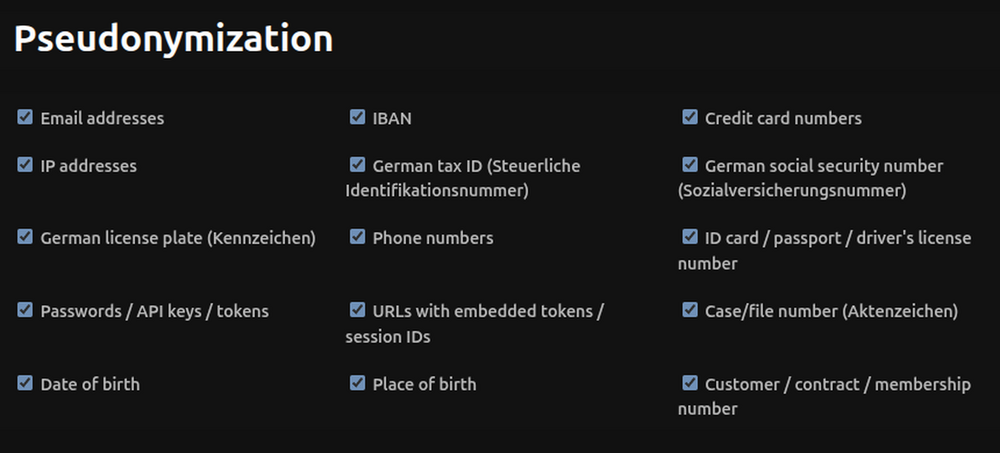
Everything is stored as plain text on your server. When entries are read out, OwnMemory replaces recognized personal details with placeholders before they go to the AI. Three levels detect them:
Fixed formats
OwnMemory reliably detects email addresses, IBANs, credit card numbers, IP addresses, tax IDs, license plates and phone numbers by pattern and checksum.
Signal words
By words such as case number, customer number, date of birth or credentials. In German and English, extendable in the admin area.
AI detection
A local AI model detects names, addresses and special categories under the GDPR. Unclear matches go to a review queue.
04 Access

06 Frequently asked questions
Storage and search run on your server, including the AI model for the search. OwnMemory does not send any knowledge to an external service.
Only the areas you grant to its access key. OwnMemory replaces sensitive details with placeholders beforehand.
You block it immediately in the administration. The key is shown only once and stored afterwards only as a check value.
No. Only the administrator can change mandatory knowledge.
Yes, with two-factor login, a lockout after failed attempts and logs.
06 Contact
Let’s talk about your data protection requirements
In an initial conversation we clarify whether and how OwnMemory fits your way of working, your AI tools and your infrastructure. We are happy to show you a demo.
What we can clarify together
- Which knowledge your team and your AI tools should share
- Who may see what, with areas and access rights
- How OwnMemory fits into your systems